
Comparison
The best AI photo picker apps, compared
The best AI photo picker depends on the job. Picker AI and Topit rank a batch of your photos for a purpose, curator builds Instagram carousels from your camera roll, Photofeeler collects human votes on one photo at a time, and Aftershoot culls professional shoots.
We make Picker AI. Everything below about the other apps comes from their own websites, help centers and store listings, checked on November 21, 2026.



Scan with your phone camera
Picker AI for iPhone and Android. Updated .
Top Choices
Instagram“Which dinner pic do I post?”
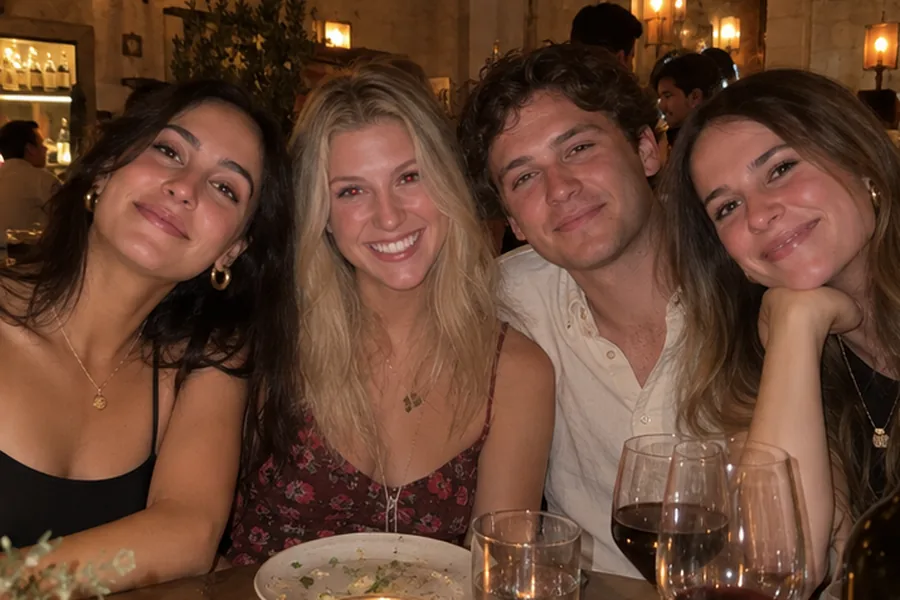 #193.7
 #278.2
 #366.0
Picker AI Insights
Post the last frame (93.7). All four faces are sharp, everyone's eyes are open, and the candlelight is warm without blowing out. The silly-face shot (78.2) is fun for a story, but nobody looks like themselves.
The short answer
- A batch of similar photos and one place to use them: Picker AI (iPhone and Android, up to 200 photos at a time) or Topit (iPhone, Android and web).
- Hundreds of trip photos you want to post as a carousel: curator (iPhone).
- One photo, and you want to know how strangers read it: Photofeeler (web).
- Your first photo on a dating app: the app's own tool. Hinge has Top Photo, Bumble has Best Photo, Tinder has Photo Selector.
- Thousands of RAW files from a paid shoot: Aftershoot (Windows and macOS).
At a glance
| App | Who judges | Photos per run | Platforms | Best for |
|---|---|---|---|---|
| Picker AI | AI | Up to 200 | iPhone, Android | Choosing what to post from a batch |
| Topit | AI, tuned to your taste; friends can vote | A batch (limit not listed) | iPhone, Android, web | Rankings that learn what you like |
| curator | AI | Your camera roll | iPhone | Ready carousels and stories |
| Photofeeler | Real people | 1 per test | Web | How strangers read one photo |
| Hinge, Bumble, Tinder tools | AI inside each app | Your profile photos (Tinder: camera roll) | Inside each app | Your first dating photo |
| Aftershoot | AI | Thousands | Windows, macOS | Culling professional shoots |
The apps, one by one
Picker AI
iPhone and Android
Our app
- Best for
- Picking the photo to post, or the lead photo for a profile, from a batch of near-identical shots.
- How it works
- You add up to 200 photos at a time (Basic ranks 4, Pro 50, Max 200) and choose what they are for: Instagram, a dating app, a professional profile, or your own question. Picker ranks every photo, shows the top three with a score out of 100, and writes a short note on why they won.
- Where it falls short
- It doesn't group near-duplicates, build carousels, learn your personal taste over time or collect votes from people. It sends a smaller copy of each photo to a cloud AI model to be scored and doesn't save your photo files.
Source: this site
Topit
iPhone, Android, web
AI ranker that learns your taste
- Best for
- Ranking a batch for a destination when you want the ranking to learn what you like, or want friends to weigh in.
- How it works
- Topit ranks a batch for where it is going (dating, Instagram, LinkedIn, TikTok and more), learns your taste from quick this-or-that picks, groups near-duplicates and explains each pick. It also suggests poses, and an iMessage app lets friends vote on a shortlist.
- Where it falls short
- The taste session adds a step before your results; its listing says photos are ranked “in minutes”. The pages we checked don't say how many photos one ranking can take.
Source: Topit website, Topit on the App Store
curator
iPhone
Carousel builder
- Best for
- Getting a trip or a busy month posted as Instagram carousels and stories.
- How it works
- curator sorts your camera roll by day and place, drops duplicates and weak shots, and hands you finished carousels: photos in order, cropped, with a caption draft and a short note on why each one made the cut. You keep, swap or refine each pick, then post it yourself.
- Where it falls short
- It is built around posts; its pages don't cover dating profiles or headshots. Its own guide says it runs on iPhone only, in English, and that your first posts “aren't instant”.
Source: curator website, curator guide, curator on the App Store
Photofeeler
Web browser
Human votes
- Best for
- Learning how strangers read one specific photo before you use it.
- How it works
- Real people rate your photo on three traits for its category and can add short notes. The traits are smart, trustworthy and attractive for dating; competent, likable and influential for business; confident, authentic and fun for social. You earn votes by rating other people's photos, or buy credits for faster results.
- Where it falls short
- One photo per test, by design. People have to vote, so Photofeeler says results take longer than instant AI tools. There was no Photofeeler app on the App Store or Google Play when we checked. More on this in Photofeeler alternative.
Source: Photofeeler website, Photofeeler FAQ, Photofeeler blog
Hinge, Bumble and Tinder
Inside each app
Built into the dating apps
- Best for
- Choosing which of your profile photos goes first, inside that one app.
- How it works
- Hinge's Top Photo uses a machine learning model to predict which of your profile photos is most likely to get a Like and puts it first. Bumble's Best Photo puts your most popular photo first, and Bumble is testing AI photo feedback that flags things like mirror selfies, sunglasses and duplicates. Tinder's Photo Selector suggests profile photos from your camera roll, matched to a selfie or a photo of you, and Photo Tips suggests swaps for more variety.
- Where it falls short
- Each works only inside its own app and doesn't help with Instagram or LinkedIn. Hinge and Bumble reorder photos you have already uploaded, so you still choose the candidates. In their favor: Tinder says Photo Selector runs entirely on your phone.
Source: Hinge Help Center, Top Photo, Bumble Support, photos, Bumble Support, photo feedback, Tinder Help Center, Photo Selector, Tinder Help Center, Photo Tips
Aftershoot
Windows and macOS
Culling for photographers
- Best for
- Professional photographers going from thousands of frames to a final selection.
- How it works
- Desktop software that scores a whole shoot, groups duplicates, flags closed eyes and blur, and exports selections to Lightroom Classic or Capture One. It works offline.
- Where it falls short
- It is built for a photographer's workflow on a computer, not for choosing a profile photo or what to post from your phone.
Source: Aftershoot website
Retake AI
iPhone
A different job: AI edits
- Best for
- Making new, edited versions of photos of your face.
- How it works
- You upload 12 photos of yourself to build a personal AI model, and it edits and reimagines new pictures of you.
- Where it falls short
- It changes photos rather than choosing among them. If you already have plenty of real photos and can't choose, a picker is the tool.
Source: Retake AI on the App Store
Five questions to ask before you choose
- Do you need a ranking or a finished post? Rankers tell you which photos are strongest. curator goes further and arranges the post.
- AI or people? AI answers while you wait and can look at a whole batch. People take longer but tell you how real strangers react. You can use both: narrow a batch with AI, then test the top two or three with people.
- How many photos? Four options and two hundred options are different problems. Check the limit before you start.
- Where will the photo be used? A good dating photo and a good LinkedIn photo are not the same photo. Pick a tool that asks what the photo is for.
- What happens to your photos? Some tools run on your phone, some send copies to a cloud AI model, and human-vote sites show your photo to other members. Read the privacy page.
Where Picker fits
We built Picker for the moment you have thirty versions of the same evening and need one. It ranks a big batch for the purpose you choose and tells you why the top photos won, so you can agree or disagree with a reason.
It is not the right tool for everything on this page. If you want strangers' opinions, use Photofeeler. If you want the carousel built for you, use curator. If you are a working photographer with a card full of RAW files, use Aftershoot.
Choosing for a specific place?
Read the guides for dating profile photos, the Instagram photo picker, and what a photo score can tell you.
Questions
What is the best AI photo picker app?
It depends on the job. To rank a batch of your own photos for a post or a profile, use a ranker such as Picker AI or Topit. To turn a trip into a ready Instagram carousel, use curator. To learn how strangers read one photo, use Photofeeler. To cull thousands of frames from a professional shoot, use Aftershoot.
Is there an AI photo picker for Android?
Yes. Picker AI is on Google Play (Android 8 or later) as well as the App Store, and Topit says it runs on Android and in a web browser. curator is iPhone only. Photofeeler runs in any phone or computer browser.
Can an AI photo picker tell which photo will get the most likes?
No app can promise that. An AI score predicts how well a photo fits a purpose, based on things like expression, eye contact, light, focus and framing. Hinge's Top Photo and Bumble's Best Photo test your own profile photos and move the most popular one first, and Photofeeler uses votes from real people.
How many photos can Picker AI rank at once?
Basic ranks up to 4 photos at a time, Pro up to 50 and Max up to 200.
Do photo picker apps keep my photos?
It varies, so read each privacy policy. Picker sends a smaller copy of each photo to its AI model to be scored and doesn't save your photo files. Tinder says its Photo Selector scans your camera roll on your phone. Photofeeler shows your photo to other members while a test runs, then makes it private again.
What is the difference between a photo picker and a culling tool?
A culling tool such as Aftershoot helps a photographer go from thousands of frames to a few hundred keepers by removing blinks, blur and duplicates. A photo picker helps you choose the one photo, or the few, to use for a specific purpose, such as a dating profile or an Instagram post.
Sources
- Topit, mytopit.com (checked Nov 21, 2026)
- Topit AI, App Store listing (checked Nov 21, 2026)
- curator, curator.so (checked Nov 21, 2026)
- curator, "Best AI photo picker apps for iPhone" (checked Nov 21, 2026)
- curator, App Store listing (checked Nov 21, 2026)
- Photofeeler, homepage and FAQ (checked Nov 21, 2026)
- Photofeeler blog, "Best Photo Feedback Tools" (Jul 22, 2026)
- Hinge Help Center, "What is Top Photo?" (updated Jun 29, 2026)
- Bumble Support, "Uploading profile photos and videos" (checked Nov 21, 2026)
- Bumble Support, "Receiving feedback on your photos" (checked Nov 21, 2026)
- Tinder Help Center, "Photo Selector" (checked Nov 21, 2026)
- Tinder Help Center, "Photo Tips" (checked Nov 21, 2026)
- Aftershoot, AI photo culling (checked Nov 21, 2026)
- Retake AI, App Store listing (checked Nov 21, 2026)